Best AI Tools for Fashion Catalog Images (2026)

Prateek Gupte
The best AI tools for fashion catalog images in 2026 are Caimera (whole catalogs: folder upload, one model across every SKU, on-model plus ghost mannequin and flat lay), Botika (flat lay to on-model with retouch rounds), WearView (ghost mannequin and flat lay batches of 50), Photoroom (cheap batch cleanup) and Layr Studio (INR packs for Indian brands).
One great AI image is easy now. A catalog is 300 SKUs on the same model, in the same light, cropped to each marketplace’s rules, at a price that beats your studio. This list judges AI catalog photography on image 300, not image 1. We checked every competitor’s pricing and features on their own sites on November 4, 2026; where a vendor doesn’t publish a number, we say so.
Key takeaways
Judge catalog tools on five things: bulk upload, one model across hundreds of SKUs, output types (on-model, ghost mannequin, flat lay), marketplace sizing, and cost per approved image.
Caimera covers all five in one subscription, at about $0.99 per catalog image on Pro billed annually.
Botika, WearView and Uwear are strong single-purpose catalog tools. Photoroom and Claid are cheapest for batch cleanup.
Canva doesn’t generate on-model photos. Use it for layouts and size variants.
Amazon.in wants adult clothing main images on a standing model on pure white, and asks you to tag photorealistic AI-generated people in the file’s metadata.
Comparison table: AI tools for fashion catalog images
Tool | Best for | Starting price (as of Nov 2026) | Key catalog capability | Free plan/trial |
Caimera | Whole catalogs: on-model, ghost and flat lay from one platform | Pro $99/user/month billed annually (100 catalog images, about $0.99 each); Enterprise from $1,500/month | Folder upload, same custom model across SKUs, any HEX background, Image to Ghost | Free plan: 20 credits, up to 2 catalog images, no card |
Botika | Flat lay to on-model for small and mid-size apparel brands | Pro $46/month billed annually (600 credits/year, 1 credit per photo) | “One model across the whole collection”, bulk upload, retouch rounds, Shopify app | Free trial (length not stated) |
WearView | Ghost mannequin and flat lay in batches | Lite $290/year (50 credits/month) | Ghost mannequin and Pro Flat Lay up to 50 garments per run | No free trial listed; 14-day refund on first plan |
Uwear | Pay-as-you-go catalogs from mixed supplier photos | $0.10 per credit, from 2 credits per photo; no subscription | Saved model plus saved art direction for the whole catalog | Free photoshoot of 3 products |
Photoroom | Batch cleanup and backgrounds at the lowest price | Pro $7.50/month billed yearly ($12.99 monthly) | Batch editing of hundreds of images, ghost mannequin and virtual model tools | Free trial on Pro and Max |
FASHN | Developers and small batches with 4K output | Basic $16/month billed yearly; API $0.075 per credit | Face reference keeps one model consistent; 4K on every plan | 10 free credits in the app |
Claid | High-volume edits and API pipelines | Essentials $9/month (500 credits) | AI Fashion at 4 credits per image, batch via API | 50 free credits |
Layr Studio | Indian brands that want INR packs, no subscription | ₹4,499 for 30 shots (down to ₹117 a shot) | One model held across a whole shoot, up to 50 pieces per upload | First 15 shots free |
Canva | Layouts, size variants and marketplace banners (not generation) | Pro US$144/year (₹4,000/year in India) | Bulk design creation, custom dimensions | Free plan; Pro trial |
What makes a tool good at catalog work (not just one image)
These are the criteria that break first when a team moves from 10 test images to a full season.
Bulk input. A folder of 200 flat lays, or one garment at a time?
Consistency across SKUs. Do model, pose, light and background hold from SKU 1 to SKU 300? SKU consistency is what makes a category page look like one brand.
Output types. A PDP set is usually on-model front and back, a ghost mannequin or flat lay packshot, and a detail.
Marketplace fit. White backgrounds, aspect ratios and pixel sizes differ by channel. Set them once per batch.
Cost per approved image. Count the rejects and the review time, not just generations. Published studio rate cards put simple on-white images at about $30–$40 each, and on-model costs several times more.
1. Caimera: best for producing a whole catalog in one place
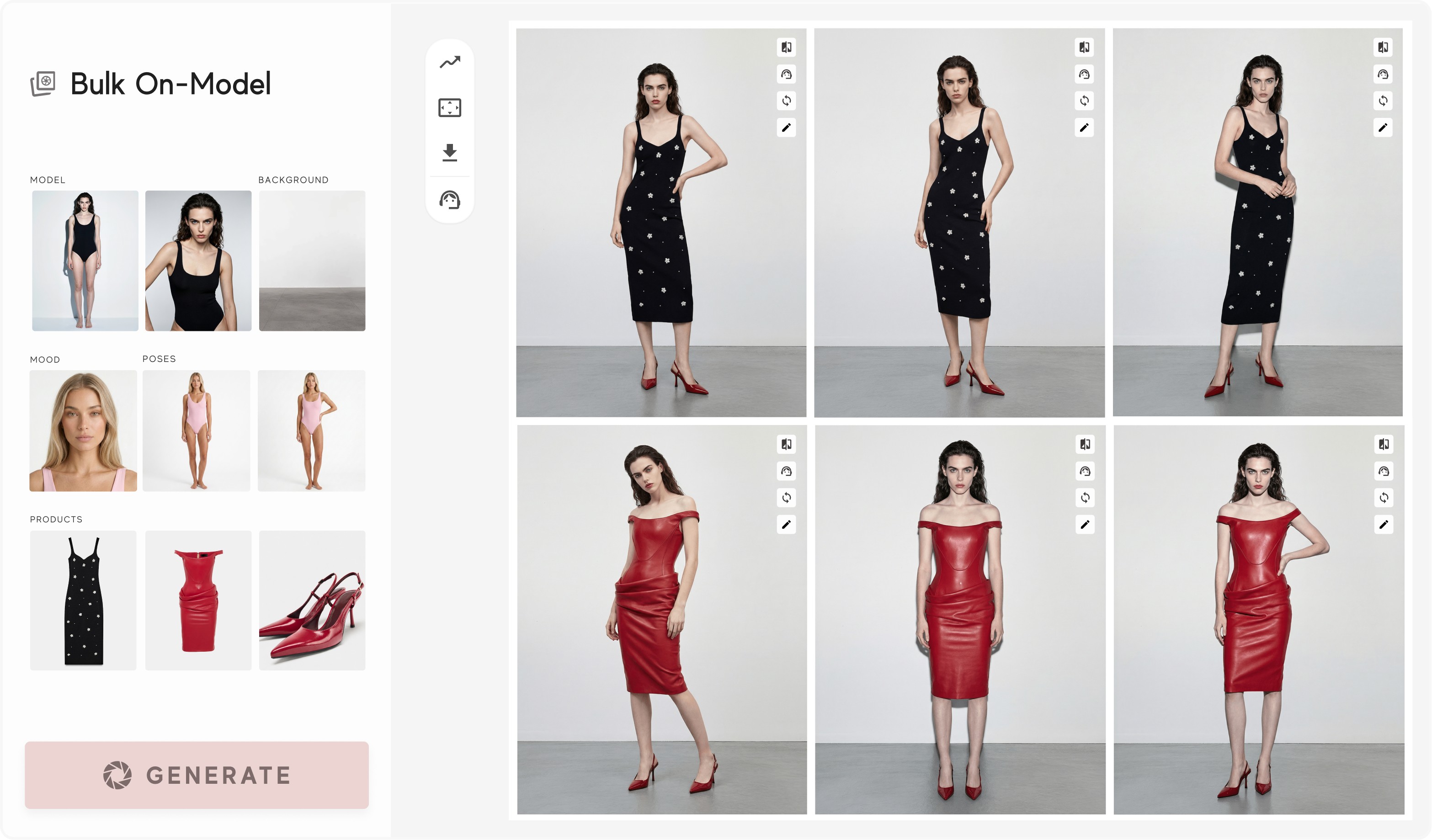
Caimera is an AI visual production platform for fashion teams. Its Flatlay to Catalog tool turns flat lays into bulk on-model images across models, poses and backgrounds, at 2K by default.
What it does for catalogs
Folder upload. One subfolder per outfit; Caimera sorts each image into Top, Bottom, Dress, Footwear or Accessories and builds the catalog in one job.
Same model on every SKU. Create a private custom model from two photos in under a minute and reuse it across Catalog, Editorial and video.
Background by HEX code. Shoot a whole batch on any solid colour (paid plans): #FFFFFF for marketplace main images, your brand grey for your site.
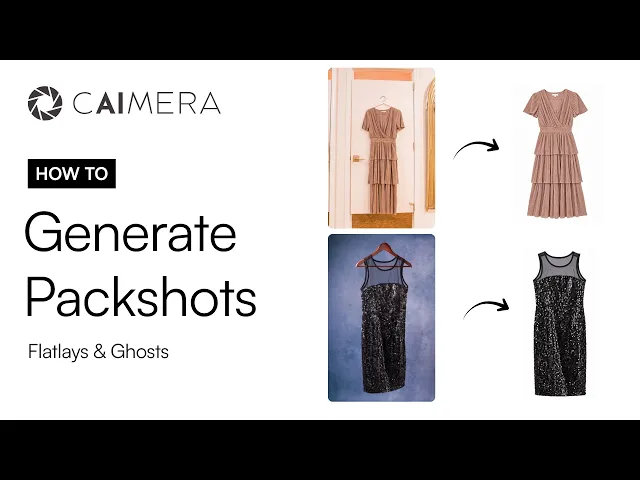
Ghost mannequin and flat lay. Image to Ghost turns on-model photos into ghost mannequin or flat lay packshots.
Fix logo (Beta). Redraws only a garbled logo, using the real logo from your product image.
Workflows (Beta). Chain flat lay → on-model → three angles → colorways and run it on a batch of up to 100 images, or from Claude or ChatGPT on Pro and above.
Watch the flat lay and ghost mannequin packshot workflow: AI packshots: flat lay and ghost mannequin.
Best for: fashion brands and retailers that need on-model, ghost and flat lay images for every SKU, plus campaign and video from the same uploads.
Pricing: Pro is $99 per user per month billed annually, with up to 100 catalog images a month, about $0.99 each. Enterprise starts at $1,500 a month and adds exclusive models, digital twins and legal indemnification. See Caimera pricing.
Strengths
One subscription covers on-model, ghost mannequin, flat lay, editorial and video.
Unlimited free edits on paid plans.
Optional EU AI labels and XMP metadata for AI disclosure on download, including the contains-synthetic-performer keyword Amazon asks for on images with AI-generated people.
Proof: Maggie the Label built ghost mannequin workflows for ecommerce, now makes about 70% of its website imagery with Caimera, and reports $150K saved and 30% more sales. H&M, Puma and Steve Madden also use Caimera.
Limitations
Pro includes 100 catalog images per user per month, so a 500-SKU season needs more seats, credit top-ups or Enterprise.
Folder upload needs a computer, and Fix logo and Workflows are still in beta.
Pick something else if you only need background removal and cropping on photos you already have. Photoroom or Claid will do that for less.
2. Botika: best for flat lay to on-model on a fixed annual budget
Botika turns flat lays, hanger shots and ghost mannequin photos into on-model images, with bulk upload and “one model across the whole collection.”
Best for: small and mid-size apparel brands, especially on Shopify, that want on-model images with retouch rounds included.
Pricing: Pro is $46 a month billed annually ($55 monthly) with 600 credits a year at 1 credit per photo, roughly $0.92 a photo. The Advanced price showed two conflicting figures when we checked; confirm with Botika.
Strengths
Pro includes 2K output and 2 retouch rounds per photo; Advanced adds 4K, 3 retouch rounds and custom background colours.
Shopify app and iOS app.
Enterprise adds custom AI models and white-glove quality control.
Limitations
Pro has a limited model and background selection; the full library is on Advanced.
On-model is the focus. The Botika pages we checked describe ghost mannequin photos as an input, not as an output.
3. WearView: best for ghost mannequin and flat lay batches
WearView covers flat lay to on-model, AI ghost mannequin, Pro Flat Lay and video.
Best for: catalog teams whose bottleneck is packshots, not models.
Pricing: Lite is $290 a year (50 credits a month), Pro $490 a year (200 credits, about 100 HD images). HD uses 2 credits, 2K 3, 4K 5. A done-for-you ghost mannequin service costs $0.19 per image.
Strengths
Ghost mannequin and Pro Flat Lay handle up to 50 garments per run on every plan.
HD, 2K and 4K on all plans.
Your own consistent AI model (same face) on Pro and above.
Limitations
No free trial listed; you get a 14-day refund on your first plan instead.
Lite has 20 ready-made models and no custom model.
4. Uwear: best for pay-as-you-go catalogs from mixed supplier photos
Uwear turns flat lays, packshots, ghost mannequin shots and supplier photos into one consistent set of on-model photos, using one saved model and one saved art direction.
Best for: marketplaces and multi-brand retailers that get product photos from many suppliers and need them to look like one shoot.
Pricing: No subscription. Credits cost $0.10 each ($7 minimum) and never expire; images start at 2 credits, so from about $0.20 an image.
Strengths
Batch workflows run “one job at any volume.”
Saving a model from a generated photo is free; creating one costs from 1 credit.
Limitations
No free tier or trial, though there is a free photoshoot of 3 products with no account needed.
Per-image cost varies by image model, so budget from the /models rates, not the headline.
Ghost mannequin appears as an input use case; Uwear’s pages we checked don’t describe ghost mannequin output.
5. Photoroom: best for cheap batch cleanup and backgrounds
Photoroom is a product photo editor with fashion tools on top: AI Fashion Models, Virtual Model, Ghost Mannequin and Unwrinkle, with batch editing of “hundreds of images.”
Best for: brands that already shoot their own photos and need consistent backgrounds, shadows and crops across a catalog.
Pricing: Pro is $7.50 a month billed yearly ($89.99 a year) or $12.99 monthly. Max is $20.99 a month billed yearly and Ultra $82.50. The API is billed separately; app plans include no API calls.
Strengths
Lowest entry price on this list for batch editing.
Pro includes up to 1,600 AI Fashion Model generations at 1K a month.
Limitations
AI Fashion Models are 1K on Pro. 2K starts on Max (up to 185 a month) and 4K is Ultra only.
It’s an editor first. Model consistency across hundreds of SKUs gets less control than in fashion-only tools.
6. FASHN: best for developers and small batches at 4K
FASHN offers product to model, model swap, try-on, packshots and video, plus an API. A face reference keeps one model consistent.
Best for: brands with a developer who wants to automate on-model images for every new SKU through the API.
Pricing: Basic is $16 a month billed yearly ($19 monthly) with 200 credits; Pro $41 and Agency $83 billed yearly. Most tools use 1 credit per image. A face reference adds 2 credits per image in the Studio (3 on the API). API credits are $0.075 each.
Strengths
4K output on every plan.
Packshot turns a photo into a ghost mannequin, flat lay or floating product shot.
Simple pay-as-you-go API at \$0.075 per credit.
Limitations
FASHN’s own comparison page lists batch editing at “up to 4 images per run” in the web app. Large catalogs mean using the API.
The face reference costs extra credits on every image, so consistency raises the real price.
7. Claid: best for high-volume edits through an API
Claid is an ecommerce image suite: upscaling, background removal, AI Fashion (on-model from flat lay or ghost mannequin), outpainting and shadows. Large batches run through its API.
Best for: marketplaces and retailers that already run an image pipeline and want to plug on-model generation into it.
Pricing: Essentials is $9 a month with 500 credits (125 AI Fashion images at 4 credits each, standard resolution up to 2K). Pro is $35 a month with 2,000 credits (500 AI Fashion images, 2K/4K). Business is custom.
Strengths
Strong catalog-prep utilities: upscale, background removal, outpaint to an aspect ratio, shadows.
50 free credits plus 50 API credits to test.
Limitations
Fashion is one module among many, with less control over a recurring model than fashion-only platforms.
Bulk on-model work is mainly an API or managed-service setup, not a folder drop in the web app.
8. Layr Studio: best for Indian brands that want INR packs
Layr Studio is an India-built AI fashion photoshoot tool. You name a collection, pick a scene, cast AI models you keep, upload “one piece or fifty” and set pose and footwear. It holds “one model across a whole shoot, or a cast of several.”
Best for: Indian D2C labels that shoot by collection and prefer paying in rupees per pack.
Pricing: Capsule is ₹4,499 for 30 shots (₹150 each), Collection ₹12,999 for 100 shots (₹130 each) and Catalog ₹34,999 for 300 shots (₹117 each). No subscription; credits last 12 months.
Strengths
First 15 shots free, no card.
Models carry over between shoots.
Limitations
On-model only from what its site shows. We found no ghost mannequin or flat lay output.
At ₹117–₹150 a shot it costs more per image than the subscription tools above at volume.
9. Canva: best for layouts and size variants, not generation
Canva won’t put your garment on a model with any fidelity. It’s where finished images become marketplace banners, size charts and social crops.
Best for: resizing and laying out the catalog images another tool produced.
Pricing: Pro is US$144 a year (₹4,000 a year in India); Business is US$250 per person a year.
Strengths: Bulk design creation and custom dimensions on paid plans, so one template becomes 200 marketplace tiles.
Limitations: Not a catalog photo generator. Don’t use it for on-model or ghost mannequin images.
For Indian brands: INR options and marketplace image rules
Paying in rupees. Layr Studio sells INR packs, and Canva prices Pro at ₹4,000 a year in India. Caimera’s public pricing is in USD; Indian brands such as BlissClub use it for weekly ad refreshes and report a 50% higher CTR, 50% lower CPC and 70% lower costs than with traditional shoots.
Amazon.in (from the Amazon.in product image guide):
Main image on a pure white background, RGB 255, 255, 255, with the product filling 85% of the frame.
Adult clothing must be shown on a model, standing (not sitting, kneeling or leaning). Clothing accessories and multipacks go flat, without a model.
No part of a mannequin may show in the main image, so ghost mannequin packshots belong in the additional images.
Size: minimum 500 px and maximum 10,000 px on the longest side. Amazon recommends 1,000+ px so zoom works. JPEG is recommended.
If a photo shows photorealistic AI-generated people, add the keyword contains-synthetic-performer to the image’s XMP dc:subject field before upload (Caimera’s AI disclosure option writes it for you), and Amazon adds a disclosure where required.

Flipkart. Flipkart’s seller guide asks for high-resolution product images on a white background, plus lifestyle shots where possible, and its QC team reviews images before a listing goes live. We couldn’t find a pixel specification in Flipkart’s public seller pages.
Myntra and Ajio. Their image specs sit inside login-only seller portals, and we couldn’t verify current numbers publicly. Pull the spec sheet from your partner portal before a bulk run instead of trusting third-party summaries.
Practical setup: shoot the on-model set on white for Amazon.in and Flipkart, keep a ghost mannequin or flat lay packshot for secondary images, and export each channel’s aspect ratio from the same source images.
How to choose an AI tool for fashion catalog images
Start with the bottleneck, not the feature list.
You need on-model, ghost and flat lay for every SKU, plus campaign images: Caimera, so it all runs from one upload and one model library.
Your problem is packshots, not models: WearView for ghost mannequin and flat lay batches, or Caimera’s Image to Ghost if you also need on-model.
You get photos from 50 suppliers and need one look: Uwear or Caimera, both built around a saved model and a saved style.
You already shoot and only need clean, consistent backgrounds: Photoroom or Claid.
You have a developer and want an API job per new SKU: FASHN or Claid.
You’re an Indian label shooting one collection at a time: Layr Studio for INR packs, or Caimera if you also need ghost mannequin and campaign output.
Then test each shortlisted tool on 20 SKUs with one model and your real backgrounds. Count approved images, and check image 20 for melted logos, waxy skin, warped prints and the same face on every SKU. For the single task of turning a flat lay into an on-model photo, see our guide to the best AI tools for flat lay to model photos. For moving catalog images into PDP and social video, see the best AI fashion video generators. For the wider field, see our 8 best AI fashion model generators.

FAQ
What is the best AI tool for bulk on-model catalog images?
Caimera is the most complete for bulk on-model catalog images: upload a folder with one subfolder per outfit, keep one custom model across every SKU, and get ghost mannequin and flat lay packshots on the same platform. Botika and Uwear are strong on-model alternatives; Photoroom and Claid suit batch background and crop edits.
How do I keep the same AI model across my whole catalog?
Save the model once and reuse it on every job. In Caimera, you create a private custom model from two photos and pick it in every catalog run. Uwear saves a model plus an art direction; FASHN uses a face reference at extra credits per image. Lock pose, background colour and aspect ratio per batch too.
How much do AI catalog images cost compared to a photoshoot?
Published studio rate cards put simple on-white product images at about $30–$40 each, and on-model work costs several times more once you add a model, stylist and studio day. AI tools on this list range from under a cent (Photoroom Pro at 1K) to about \$1 per generated image. On Caimera’s Pro plan billed annually, a catalog image costs about $0.99. Add review time and rejects to compare fairly.
Can AI make ghost mannequin images for my catalog?
Yes. Caimera’s Image to Ghost converts on-model photos into ghost mannequin or flat lay packshots. WearView handles up to 50 garments per run, Photoroom has a batch ghost mannequin tool, and FASHN’s Packshot does ghost, flat lay and floating shots. On Amazon.in, use ghost shots as additional images, since adult clothing main images need a model.
Are AI-generated model photos allowed on Amazon.in?
Amazon.in’s product image guide allows them but asks for disclosure metadata. If a product image shows photorealistic AI-generated people, add the keyword contains-synthetic-performer to the image’s XMP dc:subject field before upload, and Amazon adds a disclosure where required. The usual main image rules still apply: pure white background, 85% fill, and adult clothing on a standing model.
What image size do Indian marketplaces need for fashion?
Amazon.in requires at least 500 px on the longest side, up to 10,000 px, and recommends 1,000+ px so zoom works. Flipkart asks for high-resolution images on a white background and runs a QC check, but we found no public pixel spec. Myntra and Ajio keep their specs inside their seller portals, so download the current sheet from your account.
Start with 20 SKUs
Run 20 SKUs from your next drop through two tools on this list and compare approved images per hour. To try the whole catalog workflow in one place, Caimera’s Free plan gives you 20 credits with no card.