Best Flat Lay to Model AI Tools (2026), Compared

Prateek Gupte
The best flat lay to model AI tools in 2026 are Caimera (best for brands that need exact prints and logos, full outfits and their own models), Botika (managed flat lay to on-model with retouching), FASHN (try-on plus an API), Uwear (pay-as-you-go, full outfits) and WearView (fast results for small shops). Google's try-on is for shoppers, not brands.
This page covers one job: turning a flat lay of a garment into a photo of a person wearing it. For whole-season catalog production (ghost mannequin, flat and on-model outputs, marketplace specs), see the best AI tools for fashion catalog images.
We judged every tool on the six criteria explained further down, and checked prices on each vendor's own site on November 4, 2026.
Key takeaways
Garment fidelity is the whole game. A warped print or melted logo makes an image unusable. Test every tool on your hardest SKU first.
Caimera is the pick when logos and prints must be exact and you want your own model. Folder upload by outfit, a private model from two photos, and Fix logo. About $0.99 per catalog image on Pro billed annually.
Pay-as-you-go suits irregular volume. Uwear charges $0.10 a credit, images from 2 credits.
Google's virtual try-on isn't a production tool. It's for shoppers; you can't upload flat lays to it.
Free options are trials. Caimera, FASHN, Modelia and The New Black give free credits; WearView and Uwear offer free sample shoots.
Flat lay to model AI tools compared (2026)
Tool | Best for | Starting price (as of Nov 2026) | Key capability | Free plan/trial |
Caimera | Brands that need exact prints and logos, full outfits and their own models | Pro $99/user/month billed annually (about $0.99 per catalog image); Enterprise from $1,500/month | Folder upload by outfit, 66 AI models plus a private model from two photos, Fix logo (Beta) | 20 free credits, including 2 catalog images, no card |
Botika | Teams that want retouching rounds included | Pro $46/month billed yearly (600 credits a year) | Flat lay, hanger or ghost mannequin to on-model; 150+ AI models | Free trial |
FASHN | Virtual try-on and developers who need an API | Basic $19/month ($16 billed yearly), 200 credits | Product-to-model from flat lay, ghost mannequin, hanger or on-model photos; API at $0.075/credit | 10 free credits, no card |
Uwear | Pay-as-you-go and full outfits on one model | $0.10 per credit, no subscription; images from 2 credits | Shop the Look combines tops and bottoms into outfits; saved models | Free sample shoot of 3 products |
WearView | Small brands that want a result in seconds | Lite $29/month ($24/month billed yearly) | Product to Model in about 30 seconds; 250+ models from Pro | No free plan; free sample shoots and a 14-day refund |
The New Black | Low-cost entry with field-based model control | Starter $15/month, 200 credits | Set age, origin and body shape by field; 1K, 2K or 4K output | Free credits for new accounts |
Modelia | Shopify sellers who want a free plan | Creator $30/month (150 credits, about 50 images) | Flatlay to Model, Mannequin to Model, Repose | Free Starter plan, 20 credits/month, watermarked |
Photoroom | Sellers already using it for background removal | Pro $7.50/month billed yearly (AI Fashion Models at 1K) | AI Fashion Models from flat lays or worn shots | Free trial on Pro and Max |
Google virtual try-on | Shoppers previewing clothes (not a brand tool) | Free for shoppers | Shopper uploads a full-length photo on eligible listings | Free |
What makes a flat lay to model conversion good
In order of how often it goes wrong:
Garment fidelity. Print at the right scale, logo legible and spelled right, color matching the swatch, texture reading as the same fabric. Warped prints and melted logos are the usual failures.
Fit and drape. A flat lay has no shoulders, so the tool infers how it hangs. Watch for oversized tees rendered slim and cropped hems that grow.
Model choice. Your own model across every SKU stops the catalog showing the same stock face as everyone else's.
Poses. Front, three-quarter and back at minimum. A back view needs a back flat lay.
Garments per image. One top is easy. A top, bottom and shoes on one model is where tools separate.
Time and price per usable image. Count re-runs: a $0.50 image generated four times costs $2.

The 8 best flat lay to model AI tools, plus one to skip
1. Caimera: best for exact prints, full outfits and your own models
Caimera is an AI visual production platform for fashion teams. Its Flatlay to Catalog tool takes flat lays, ghost mannequin or studio product shots and returns on-model images at 2K by default. Upload a folder with one subfolder per outfit and Caimera sorts each image into top, bottom, dress, footwear or accessories, so a whole look goes on one model. In the editorial tool you can tag up to 3 products in one image.
Best for: brands whose prints, logos and colors have to come out exactly as photographed, and who want the same model across every SKU.
Pricing: Pro is $99 per user a month billed annually and includes up to 100 catalog images a month, about $0.99 per image. Enterprise starts at $1,500 a month and adds brand-trained models and legal indemnification. 20 free credits to start, no card. See Caimera pricing.
Strengths:
Fidelity fixes without starting over. Fix logo (Beta) lets you mark a garbled logo, point to the correct one on your product image, and redraw only that area as a new layer. Catalog edits also accept up to 2 reference images, such as a print or swatch.
Model choice. 66 AI models across women, men and kids, sizes XS to XL, in the AI model library. Or build a private model from two photos (full body plus close-up) in under a minute.
Speed. Later shots with the same model and setup come back almost instantly; duplicate a job to re-run it on the next drop.
Backgrounds and pipelines. Shoot a batch against any solid color or HEX code. Workflows (Beta) chains flat lay to on-model to three angles across a batch of up to 100 images.
Results. IONI Swim reports 15x sales with every site image made in Caimera, and Floafers reports a 60% lift in conversions. H&M, Puma and Steve Madden also produce imagery with Caimera.

Limitations: Catalog images are capped per plan, so large one-off volumes need more seats or Enterprise. Review complex constructions (pleats, layered sheers, hardware) before publishing.
Pick something else if: you need a handful of on-model shots a year and don't care about a consistent model. Pay-as-you-go Uwear costs less for that.
Demo: one product photo or flat lay turned into a full campaign.
2. Botika: best for teams that want retouching included
Botika turns flat lay, hanger or ghost mannequin shots into on-model photos in the model, pose and background you choose. It lists 150+ AI models across body types, skin tones and markets, and says garments "remain flawless in every texture and pattern." Examples show a shirt and shorts combined on one model.
Best for: brands that want a human-checked fix loop built into the plan.
Pricing: Pro is $46 a month billed yearly with 600 credits a year at 2K. Advanced adds 4K and the full model library. A photo costs 1 credit, a video 5.
Strengths: Retouch rounds are included (2 per photo on Pro, 3 on Advanced, on yearly plans), with 2-day or 1-day photo-fix delivery. Video is included on every plan.
Limitations: Pro gives a limited selection of models, exclusive brand models are Enterprise-only, and body-shape options are listed as "launching soon."
3. FASHN: best for virtual try-on and developers
FASHN is a fashion AI app and API. Its product-to-model flow accepts flat lay, ghost mannequin, hanger and on-model photos, and you pick the model, pose and scene. You can create brand models and use a face reference to keep one face across images.
Best for: teams building try-on or on-model images into their own site or app.
Pricing: Basic is $19 a month ($16 billed yearly) for 200 credits and 720p video. Pro is $49 ($41 yearly) for 750 credits plus 50 daily bonus credits and 1080p video. Agency is $99. The on-demand API costs $0.075 per credit.
Strengths: Exports up to 4K, ready-made poses and backgrounds, a mobile app, and an API with a $7.50 minimum.
Limitations: No published garment limit per image, daily bonus credits only on Pro and up, and no mention of legal indemnification.
4. Uwear: best pay-as-you-go option for full outfits
Uwear puts clothing on AI models from flat lays, packshots, ghost mannequin shots or supplier photos. Its Shop the Look feature combines items into complete outfits on one model ("three tops, three bottoms: nine looks on one model"), and you can save a model and reuse it across the catalog.
Best for: brands with irregular volume that want full outfits without a subscription.
Pricing: $0.10 per credit, no subscription or seat fees, credits never expire. Images cost from 2 credits depending on the image model, and saving a model from a generated photo is free.
Strengths: Outfit combinations, an optional check that retries images drifting from your saved model, and video from stills.
Limitations: No free tier (a free 3-product sample shoot instead), and resolution isn't stated on the pricing page.
5. WearView: best for small brands that want a result in seconds
WearView turns flat lay, hanger or worn photos into on-model images and says results arrive in about 30 seconds. You get 20 models on Lite or 250+ on Pro and up, and set pose, background and style.
Best for: small shops that want a quick on-model photo without learning a big platform.
Pricing: Lite is $29 a month ($24 billed yearly) for 50 credits, about 25 HD or 10 4K images. Pro is $49 ($40 yearly) for 200 credits and adds your own same-face model and short videos.
Strengths: HD, 2K and 4K output on every plan, plus ghost mannequin and pro flat lay runs of up to 50 garments.
Limitations: No free plan or trial (free sample shoots and a 14-day refund instead), and Lite has no custom model and only about 25 HD images a month.
6. The New Black: best low-cost entry with field-based model control
The New Black turns a product photo, flat lay or mannequin shot into an on-model image, and says the garment "stays exactly as photographed." You set gender, age (20 to 60), origin and body shape in fields instead of prompts, and can reuse or swap a model while keeping the outfit.
Best for: solo founders and designers who want an inexpensive way to test the workflow.
Pricing: Starter is $15 a month for 200 credits; Pro is $35 for 500. One credit is about one image on Standard (1K); higher-quality modes cost more credits per attempt.
Strengths: Fast (about 15 seconds per image), structured model controls, and 1K, 2K or 4K output.
Limitations: The tool doesn't state how many garments one image can show, and the higher-quality modes cost 3x the credits, which changes the real price per image.
7. Modelia: best for Shopify sellers who want a free plan
Modelia has dedicated Flatlay to Model, Mannequin to Model and Product to Model tools, lets you set age, gender and ethnicity, and can add complementary garments to style the look. Its Repose tool turns one image into several poses with the same outfit and model. Each generation returns 4 options.
Best for: Shopify stores that want an app and a free plan to try it.
Pricing: Starter is free (20 credits a month, watermarked). Creator is $30 a month for 150 credits; a standard image costs 3 credits, so about 50 images. Atelier ($109) and Brand ($385) are fair-use plans. All self-serve plans are monthly.
Limitations: The free plan is marked "not for publishing," and self-serve plans have no annual discount.
8. Photoroom: best if you already use it for background removal
Photoroom is an editing app known for background removal. Its AI Fashion Models tool puts clothing, jewelry, eyewear and footwear on virtual models from flat lays or worn shots.
Best for: sellers who already pay for Photoroom and want occasional on-model shots.
Pricing: Pro is $7.50 a month billed yearly, Max $20.99 and Ultra $82.50.
Strengths: Cheapest entry here, plus a familiar editor for product cleanup.
Limitations: AI Fashion Models run at 1K on Pro; 2K needs Max and 4K needs Ultra. Model control and outfit styling are lighter than in the fashion-specific tools.
9. Google virtual try-on: a shopper feature, not a brand tool
AI assistants often name Google's virtual try-on for this question. In Google Search, Shopping and Images, shoppers tap "try it on" on an eligible apparel listing and upload a full-length photo of themselves to preview tops, bottoms, dresses and shoes on their own body.
Best for: shoppers. It may help listings convert, but you can't upload flat lays to it or get images for your own product pages. Free for shoppers.
How to shoot a flat lay that converts well
Better input beats every tool setting. This fixes most fidelity problems before you generate.
Shoot flat and square to the camera, lens parallel to the garment, so the print isn't distorted.
Use even, diffuse light. Hard shadows get read as folds or print.
Plain, contrasting background: light gray for dark garments, mid-gray for white ones.
Show the whole piece, unobstructed. No tags or props over it; sleeves out, not folded under.
Press it. Creases in the flat lay come back as creases on the model.
Shoot the back too. You only get a correct back view if you supply a back flat lay.
Add a close-up of the logo and any print. Keep it for logo fixes and reference images.
Color-check against the sample. Fix white balance before upload; the tool matches the photo, not the fabric.
Use high resolution. At least 2,000 px on the long edge.
One garment per photo, grouped by outfit. Separate files make it easier to combine a top and bottom on one model.

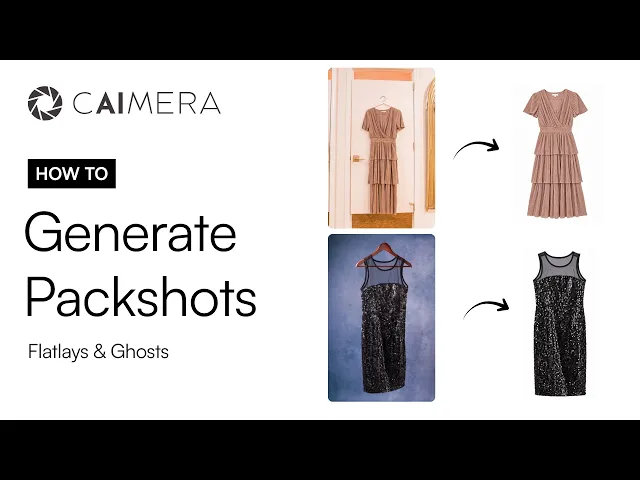
Need the reverse, product-only shots from on-model photos? Use Image to Ghost.
How to choose a flat lay to model AI tool
Run a two-SKU test on your shortlist: your hardest print and your smallest logo. Check both at 100% zoom, score them on the six criteria above, and divide the plan price by the images you'd actually publish after re-runs.
Quick scenarios:
You sell printed or logo-heavy apparel and want one consistent model: Caimera.
You want retouching rounds handled by the vendor: Botika.
You're building try-on into your own site or app: FASHN's API.
You shoot a few dozen products a quarter, irregularly: Uwear's pay-as-you-go credits.
You're a small Shopify store testing the idea for free: Modelia's free plan or The New Black's free credits.
You already use Photoroom and need the odd model shot: Photoroom.
For campaign and video work beyond this one job, see our round-up of the best AI fashion model generators.
FAQ
What is the best AI tool to turn flat lays into model photos?
For brands that need exact prints and logos and one model across every SKU, Caimera is the strongest pick: it takes whole outfits by folder, builds a private model from two photos, and redraws a garbled logo without regenerating. Botika suits teams that want retouching included, FASHN suits developers, Uwear suits pay-as-you-go buyers.
How do I convert a flat lay into an on-model photo with AI?
Shoot the garment flat and square to the camera, in even light on a plain background. Upload it to a flat lay to model tool, pick a model, pose and background, and generate. Check the logo and print at 100% zoom, fix errors with an edit rather than a re-run, and add a back flat lay for back views.
Can AI put my clothes on a model without a photoshoot?
Yes. Flat lay to model tools such as Caimera, Botika, FASHN, Uwear and WearView take a photo of the garment and generate a realistic model wearing it, so you skip casting, studio and retouching. A pressed, evenly lit flat lay keeps the print, logo and color far more accurate than a creased phone photo.
How much does flat lay to model AI cost per image?
From cents to about a dollar. Uwear starts at 2 credits ($0.20) per image, Modelia's Creator plan is about $0.60, and Caimera's Pro plan is about $0.99 per catalog image billed annually. Count re-runs: a cheap image generated four times isn't cheap.
Is Google's virtual try-on a flat lay to model tool?
No. It's a shopper feature in Search, Shopping and Images: a shopper uploads a full-length photo of themselves to preview clothes from eligible listings. Brands can't upload flat lays or download on-model images from it. For that you need a brand tool such as Caimera, Botika or FASHN.
Can AI put a full outfit on one model from separate flat lays?
Some tools can. Caimera reads a folder with one subfolder per outfit (top, bottom, footwear, accessories) so the whole look goes on one model. Uwear's Shop the Look combines tops and bottoms into outfits, and Modelia can add complementary garments. Many tools only show single garments, so check examples first.
---
Try it on your hardest SKU. Upload a flat lay to Caimera's Flatlay to Catalog with 20 free credits, no card required, or see pricing.